Screen Capture Master 2.9
Screen Capture Master is a tool for making screenshots
Program info
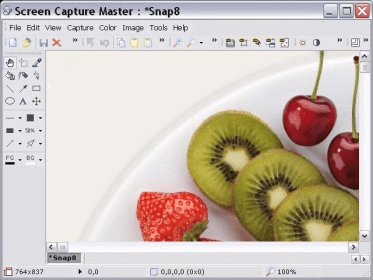


Screen Capture Master is a tool that allows you to make screenshots of your screen. It also offers image editing features, so you can modify the screenshots after they have been taken. You can capture the entire screen, capture a certain region that you have selected with the mouse, capture a specific frame pointed at with the mouse, capture the active window, and capture the working area of the active window. You can assign hotkeys for each capturing mode, set the program to include the cursor image, and play a sound when capturing. Also, you can auto-save the captured images into files in JPG, BMP, GIF, TGA, PNG, PCX, TIF, WMF, and EMF formats; you can use additional parameters according to the format that has been selected. Around the frame of the working area you will find toolbars with several options allowing you to edit your screenshots. You can make color adjustments such as brightness, contrast, saturation, and grayscale. You can also resize, rotate, flip, crop a region, add effects, insert text, shapes, fill with color, and more.
Pros
- After taking screenshots you can use different tools to edit your images
Cons
- Trial version places a small image in your screenshots reminding you to register
Details
Extensions

No information available
The data will be available later.Old versions

No information available
The data will be available later.Awards



Related stories
See all
In this article, we’ve compiled a list of the most popular Zoom alternatives for video calling and conferencing.

Looking for simple yet efficient (and free) video editing software? Let us give you Clipchamp.

Adobe releases Firefly Video Model, it's take on the AI-powered video generation system that has a number of advantages over the competition.